

Declared value isn’t the same as insurance. Standard carrier liability is usually capped at $100, while declaring a higher value may increase the carrier’s potential liability under its contract and applicable limits, but it doesn’t guarantee reimbursement. High-value computer shipment insurance follows the policy’s terms, including covered risks, exclusions, valuation basis, and claim conditions.
That distinction matters when a computer or other electronics shipment is damaged, lost, or delayed. Entering a value on a shipping form doesn’t automatically protect the full amount. Understand what the protection covers and what evidence a claim may require.
This guide explains declared value versus insurance, how coverage limits and deductibles affect a claim, and what to expect when reporting damage. It also covers practical steps for computers and electronics in transit, from packing to documenting the shipment, so you can make an informed decision before your cargo moves.
Key Takeaways
- A declared value can affect a carrier’s potential liability, but it isn’t a promise to reimburse the full amount.
- Policy wording determines which shipping risks are covered, how goods are valued, and what exclusions apply.
- Prompt damage reporting and well-organized evidence can help keep a claim moving.
- Valuation and deductibles affect how much of a loss may be reimbursed and what remains your responsibility.
- For computers and electronics, match protection to the shipment’s route, handling risks, and packaging.
Is declared value the same as insurance?
No. Declared value may increase a carrier’s potential liability, but it isn’t insurance or a promise to repay that amount. Whether it applies to loss, damage, or both depends on the carrier’s contract and applicable limits.
Declared Value and Carrier Liability
Declared value is the amount entered for a shipment to set or increase the carrier’s potential liability under its contract. It matters because a computer’s actual worth can exceed the carrier’s standard liability limit. For example, a laptop valued at $1,000 may have only limited carrier protection unless the shipment’s declared value and terms support a higher amount.
The declared figure doesn’t automatically determine a claim payment. The carrier’s contract and applicable limits govern its liability, so keep the recorded value consistent with the item and shipment documents.
Insurance Compared With Carrier Liability
Carrier liability is the carrier’s responsibility under its shipping contract; shipping insurance is protection governed by a separate policy’s wording. That distinction matters for electronics and other value items because each route handles coverage through different terms. An insurance policy sets out covered risks, exclusions, valuation basis, and claim conditions, while declared value changes potential carrier liability.
Third-party insurance and carrier declared value aren’t interchangeable. Compare the terms for the same shipment, including how a loss is valued and what evidence a claim requires.
Liability Limits and Exclusions
Standard carrier liability is usually capped at $100, which may fall far short of a computer’s value. A $150 phone, for example, has $50 left uncovered when the included carrier coverage is $100. A declared value can raise potential liability, but the carrier’s contract and applicable limits still control.
Coverage conditions and exclusions matter, too. Shipping insurance follows its policy wording, including covered risks and claim requirements. Electronics and other valuable goods may have specific handling or coverage terms, so make sure the item description and documents match what you’re shipping.
Coverage for Loss and Damage
A carrier’s declared value may address loss, damage, or both, depending on its contract and limits. Distinguish a missing shipment from a computer delivered with physical damage. Each may require different evidence, and the terms determine how the carrier assesses liability.
Keep tracking records and shipment paperwork together. If a computer arrives damaged, document the package and item before discarding any packaging. If it goes missing, retain the tracking history and proof of carrier handoff. A signature or tracking scan records a delivery event, but doesn’t by itself prove the contents arrived undamaged or establish their value.
Damage reporting and claim processing times
Act promptly if a computer parcel arrives damaged or goes missing. A timely report, clear records, and evidence of the packaging can help clarify how a claim is assessed.
Claim Filing Deadlines
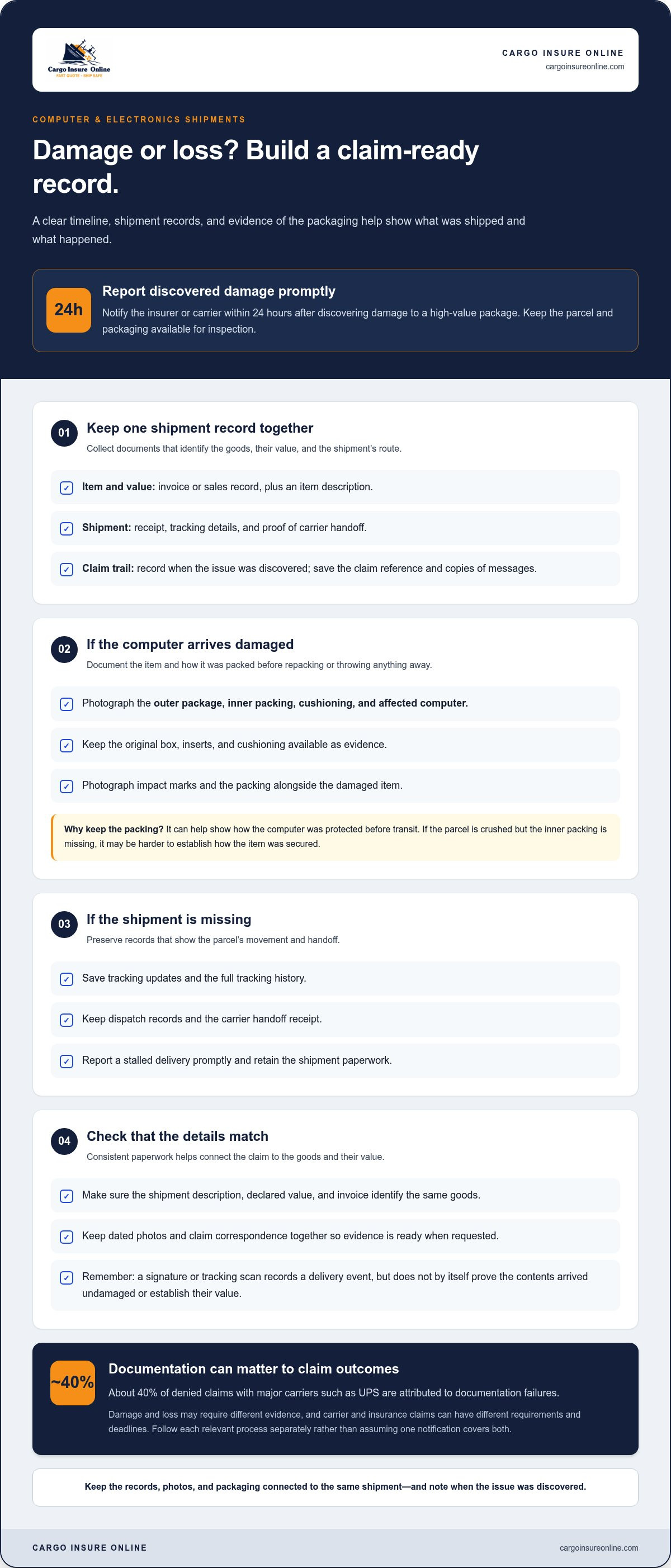
Claim deadlines are the time limits set by the carrier’s contract or insurance policy for reporting a loss or damage. Notify the insurer or carrier within 24 hours after discovering damage to a high-value package. That early notice creates a record while the parcel and packaging remain available for inspection.
Carrier and insurance claims may have different evidence requirements and deadlines. Treat them as separate processes: record when you discovered the problem, then follow each relevant claim process rather than assuming one notification covers both. For a missing shipment, preserve the tracking history and report a stalled delivery promptly.
Shipment Records and Claim Evidence
Claim evidence includes records showing what was shipped, its condition, and how the loss occurred. Keep the invoice, item description, shipment receipt, tracking details, and proof of carrier handoff together. For damage, photograph the outer package, inner packing, and affected computer before discarding anything.
Specific records help connect the damaged item to the shipment. An invoice, for example, can support the computer’s value, while delivery scans show the parcel’s route and status. Save the claim reference and copies of messages, too. A clear timeline can help distinguish damage during delivery from a problem discovered later.
Evidence requirements depend on the claim and its terms. A damaged-computer claim may need photos of the item and packaging, while a loss claim may rely more on tracking and handoff records. The shipment description, declared value, and invoice should identify the same goods. Inconsistencies can make it harder to establish what was inside and what value the coverage applies to.
- For damage: Photograph the package, cushioning, and device before repacking or disposal.
- For loss: Save tracking updates, dispatch records, and the carrier handoff receipt.
- For value: Retain the invoice or sales record linked to the shipped computer.
Packing matters because a claim may depend on how the computer was protected. Keep the original box, inserts, and cushioning as evidence, and photograph them alongside any impact marks. If the parcel is crushed but the inner packing is missing, it may be harder to show how the item was secured before transit.
Documentation gaps have real consequences: about 40% of denied claims with major carriers such as UPS are attributed to documentation failures. That figure makes the recordkeeping step practical, not administrative. Keep files in one place, including dated photos and claim correspondence, so evidence is ready when requested.
Processing time varies by claim route. Major carriers often take 30 to 60 days to investigate and issue payment, while dedicated third-party insurance providers typically resolve claims within 7 to 10 business days. A complete submission, including shipment records and damage photos, gives the reviewer the key details needed to assess the claim.
What Are the Risks of Shipping High-Value Items?
A computer can face several risks in transit: loss, physical damage, theft, or a mismatch between its declared and insured value. The route, packaging, address details, and protection terms all affect how those risks are handled.
Declared value and shipping insurance work differently. Declared value may increase a carrier’s potential liability under its contract, but it doesn’t promise payment of the stated amount. Insurance follows its policy wording, including covered risks, exclusions, valuation basis, and claim conditions. For a valuable shipment, don’t assume that entering one number at booking automatically protects against every possible loss.
For example, entering a computer’s purchase value in a FedEx declared-value field doesn’t establish separate insurance coverage. Keep the invoice and shipment record consistent with the amount entered, and understand which protection applies to the journey. Customs value, declared value for carriage, and insurance value serve different purposes and may follow different rules. Treating them as interchangeable can cause confusion if a parcel is delayed, lost, or damaged.
Labels can reveal information, too. Don’t write the contents or retail value on the outer package unless the carrier requires it. Complete the required shipment fields, and keep detailed contents and value records in your business documentation. A discreet label won’t prevent mishandling or theft, but it avoids advertising a computer or other electronics to people who see the parcel.
Accurate addressing is another practical safeguard. Before dispatch, check the recipient’s name, street, unit or suite, postal code, and phone details against the order. A missing suite number or mistyped postal code can disrupt delivery or send a package toward the wrong destination. Save the completed label and tracking record so shipment details are available if a problem arises.
Domestic and international shipments don’t carry identical risks or liability frameworks. For international air shipments, the Montreal Convention liability limit is approximately €26.97 per kilogram as of February 2026. Because a computer’s value may be high relative to its weight, weight-based liability can leave a substantial gap. For every route, match protection to the journey and relevant risks, including handling and temporary storage where applicable.
When entering declared value in a carrier’s booking system, use an amount that matches the shipment records, not a guess or an unrelated customs figure. Keep the confirmation with the invoice and tracking details. Before dispatch, compare the carrier’s declared-value terms with any separate policy wording. This review can help show whether the route, contents, and potential loss scenarios fit the intended value coverage.
Insurance valuation and deductibles
The value recorded for a computer shipment helps determine the maximum amount considered for a covered loss. The valuation basis and deductible then affect the claim payment. For a valuable device, match the insured amount to records that support its value.
Valuation basis is the method used to determine an item’s value for a claim. A policy may specify whether the amount reflects purchase cost, replacement value, or another basis. These terms matter: an older computer’s original price may differ from its current value, while replacing a specialized workstation may cost more than its second-hand resale value.
Use documents that support the amount declared. An invoice can show the purchase price, while a sales record or inventory entry can identify the model and configuration. If the computer has upgrades, keep component details with the main item record. A mismatch between the insured description and the actual shipment can complicate the valuation assessment.
Consider a phone valued at $300, with $200 of its value remaining to cover. The guide estimates that covering that $200 costs less than 1% of the item’s value. The example shows why the insured amount should reflect the gap between existing protection and the shipment’s documented value, rather than an arbitrary figure.
A deductible is the portion of an approved covered loss that remains the shipper’s responsibility. The insurer applies it under the policy terms, so it affects the final payment, not the item’s recorded value. If a covered computer loss is approved, the deductible is applied to the settlement calculation as specified in the policy.
Keep three figures distinct in your claim records: the computer’s documented value, the assessed covered loss, and the deductible. Each answers a different question. The documented value supports what the item was worth; the loss amount reflects the damage or loss assessed; the deductible is the portion retained by the insured. Clear records make the calculation easier to follow.
Before shipping, compare the policy’s valuation basis with your invoice and inventory records. Check whether the stated amount covers only the computer or also accessories shipped with it. A laptop, charger, docking station, and monitor may appear on one invoice, but describe each item clearly. Accurate details connect the shipment, its value, and any later claim.
For high value computer shipment insurance, the goal isn’t to enter the highest possible figure. Use a supportable value, keep the documents behind it, and understand how the deductible affects a covered settlement. That gives you a clearer view of the amount at risk before the package enters transit.
Computer and electronics shipment protection
In the United States, options include carrier declared value and separate shipment insurance, with protection determined by the applicable terms. Homeowners or business insurance covers a computer in transit only if the policy wording includes that exposure, so check the policy’s scope.
For high-value computer shipments, match protection to the goods, route, and risks. A computer worth more than roughly $200 is worth considering for additional coverage. Compare the coverage terms against the shipment’s maximum value and route, not just the label amount. A laptop sent to a customer, a batch of workstation parts, and a repaired device being returned may involve different shipment details.
Before pickup, confirm in writing whether coverage applies to the goods, journey, value, and relevant risks. The destination and route matter, especially for international shipments. Where relevant, clarify how the terms address temperature variation, delay, temporary storage, theft after delivery, and returns. Coverage for damage during transit may not extend to events after delivery or during a return journey.
Packaging is a key part of protecting electronics and documenting their condition. For shipments valued above $1,000, double-boxing is recommended. Leave at least two inches of void fill on every side of the inner box, and use pressure-sensitive packing tape rated at least 40 lb. These measures help separate the computer from the outer carton and reduce movement during handling.
Prepare the device before packing. Record its model and serial number, photograph its condition, and keep the invoice with the shipment records. Secure loose accessories so they can’t press against the screen or casing. Describe a monitor, laptop, power adapter, and docking station clearly rather than grouping them under a vague label such as “electronics.”
Delivery controls matter too. Require an adult signature aged 21 or older when the carrier offers that option. A signature records receipt, but it doesn’t replace insurance or prove the contents arrived undamaged. For business shipments, retain the tracking record and note who receives the package at the destination.
These precautions apply to other valuable goods, but their coverage needs may differ. Jewelry and watches, for example, have different handling and valuation considerations from computers. The practical lesson is to describe the goods accurately, document their condition, and align protection with the full journey. For computer shipments, check how the terms address damage, loss, delay, and relevant storage before dispatch.
Cargo Insure Online: Air Freight Insurance
Cargo Insure Online offers Air Freight Insurance for businesses shipping computers and other cargo by air. It’s a relevant option when a high-value shipment needs protection beyond carrier liability. Review the insurance terms alongside the goods, route, and value so you understand how coverage applies.
For computers shipped by sea or truck, Cargo Insure Online also offers Sea Freight Insurance and Trucking Insurance. Choose the option that matches the transport mode, then consider the policy wording, covered risks, exclusions, and claim requirements as part of your shipping plan.
For computers shipped by air, contact Cargo Insure Online to discuss Air Freight Insurance for your shipment.
Set up your next shipment with clarity
Plan the next steps before the computer leaves your control. Decide who maintains each shipment record, where supporting documents will be stored, and how your team will respond if a package arrives damaged. A simple process gives everyone a clear role and keeps protection aligned with the shipment’s actual journey.
Choosing high value computer shipment insurance is part of shipment planning, not a last-minute label decision. Cargo Insure Online offers Air Freight Insurance, Sea Freight Insurance, and Trucking Insurance, giving businesses options for different freight modes. Consider the route and cargo details together when deciding which coverage fits.
For a practical next step, share your shipping needs and discuss the relevant coverage with Cargo Insure Online. Contact Cargo Insure Online to start the conversation, then move your next shipment forward with a clearer plan.
Frequently Asked Questions
Evaluating Your Risk: What Qualifies as High-Value?
There’s no single value that makes every computer shipment “high-value”; weigh the item’s worth against the protection already available. Additional coverage is worth considering for electronics valued above roughly $200. A computer may also deserve extra attention if replacing it would disrupt operations or if its documented value exceeds the carrier’s potential liability. Include accessories and upgrades when estimating the shipment’s full value.
Shipping Insurance for Electronics: Is It Worth It?
Insurance may make sense when a loss would leave a substantial financial gap. For a high-value computer shipment, compare the documented value with carrier liability, then consider the policy’s deductible, exclusions, and covered route. A business sending one replacement laptop may assess the decision differently from a seller shipping computers regularly. Focus on the exposure left after existing protection, not just the item’s price.
What exclusions apply to computer and electronics shipping insurance?
Exclusions vary by policy, so read the wording for events, shipment stages, and goods that aren’t covered. For a computer shipment, check whether protection applies during transit, temporary storage, delay, returns, and after delivery. Note any packaging or evidence conditions, too. If an event is excluded, the policy won’t cover that loss even when the computer’s value is documented.
How should a computer be packed to qualify for an insurance claim?
Pack the device and accessories so they can’t shift or press against one another, and retain the packaging as evidence. For example, secure a laptop in its inner box, separate the power adapter, and cushion the inner box inside an outer carton. Photograph the device and each packing layer before sealing. Follow the policy’s packaging conditions, since careful packing alone doesn’t override them.
What documentation is required to insure a computer shipment and file a claim?
Keep records that identify the computer, support its value, and connect it to the shipment. An invoice or sales record, item description, shipment receipt, and tracking details form a useful file. Record the model and serial number, and photograph the device’s condition before packing. For business shipments, keep the order record and recipient’s delivery confirmation with those documents.
How do third-party shipping insurance policies compare with carrier coverage?
Carrier protection follows the shipping contract and declared-value terms; third-party insurance follows a separate policy. Compare them by reviewing the valuation method, covered events, exclusions, deductible, route, and claim evidence requirements. For example, a computer shipment that includes a return journey needs terms addressing that leg. Compare the protection each option provides for the actual shipment, not just the label wording.
What steps should I take if a shipped computer arrives damaged or goes missing?
For visible damage, photograph the package, inner packing, and computer before discarding anything, then notify the insurer or carrier within 24 hours of discovering the damage. For a missing parcel, save tracking updates and proof of handoff, and report the issue through the applicable claim process. Keep the invoice and shipment records together. Carrier and insurance claims may have separate deadlines, so record each submission and response.


