

What if a temperature graph raises as many questions as it answers? Cold chain data logger evidence for reefer cargo claims can help show what happened during transit, but readings need context. A temperature spike alone doesn’t establish when or why it occurred, which goods were affected, or whether a policy covers the loss.
It’s understandable to focus on the logger first. But an incomplete record, missing timestamps, or unclear links between a device and a shipment can make the evidence harder to assess. The goal is a clear, traceable record, not a claim that the data proves more than it does.
This guide explains which readings to collect, how to preserve original logger files, and how to connect them to the shipment with supporting documents such as bills of lading and reefer records. You’ll also learn how to present the evidence clearly and identify what it can and can’t show. For coverage questions, check the terms and requirements of your specific policy.
Key Takeaways
- Build cold chain data logger evidence for reefer cargo claims around traceable readings, shipment identifiers, and supporting records.
- Before dispatch, check the logger’s function, clock settings, and shipment details so its records can be linked to the right cargo.
- Pair temperature readings with reefer records, cargo condition details, and transport milestones. These records add context, but don’t assume the data proves cause or responsibility.
- Organize claim documents by shipment identity, temperature history, cargo condition, and communications. Use a concise timeline to connect key events.
- Make logger readiness part of pre-shipment planning, and review your specific policy terms and requirements separately.
What cold chain data logger evidence for reefer cargo claims can show
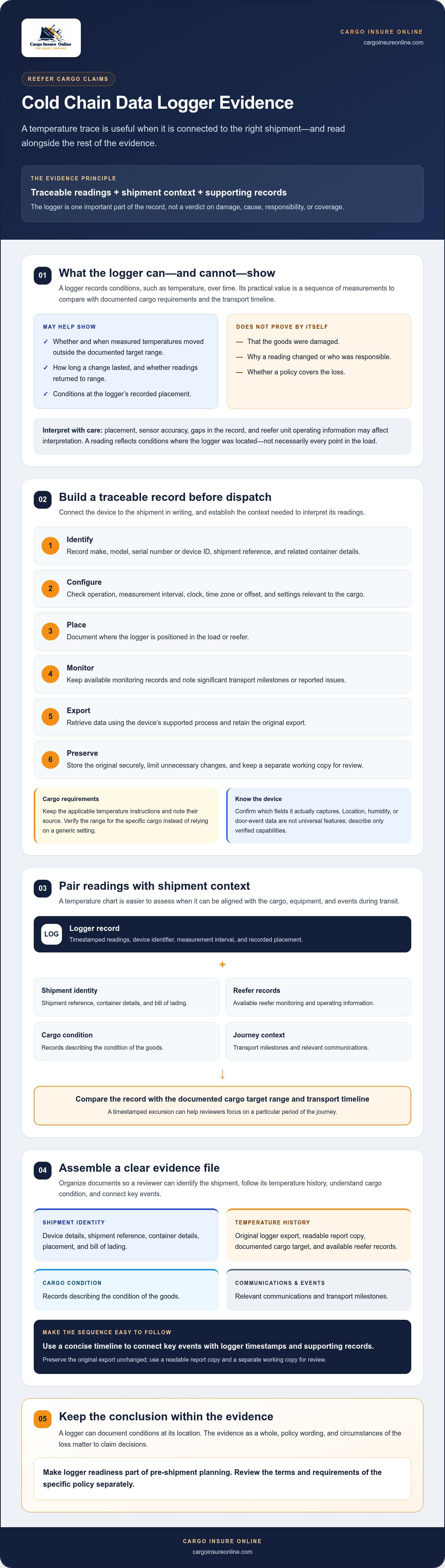
A cold chain data logger records conditions, such as temperature, over time. In a reefer claim, its practical value is that it provides a sequence of measurements to compare with the shipment’s documented temperature requirements and transport timeline. A temperature data logger may be designed for different monitoring needs, so check the device’s actual capabilities rather than assuming every logger captures the same information.
For cold chain data logger evidence for reefer cargo claims to be useful, the records need a clear connection to the shipment. Identify the logger by its device ID or serial number, note where it was placed, and record the shipment or container details it relates to. Timestamps also matter: confirm the device clock and time zone, then compare its readings with transport milestones and other records. Without that context, a chart can be difficult to interpret.
What information should a reefer shipment logger record?
Look for timestamped readings, the device identifier, and the measurement interval, meaning how often it records a reading. Some devices may also provide location data or measure other conditions, but those features aren’t universal. Relevant parameters depend on the cargo’s requirements and the logger used. Record the logger’s placement too, since a reading reflects conditions where the device was located, not necessarily every point in the load.
What can temperature records establish, and what can’t they?
Compare the readings with the documented target range for the cargo. The record may help show whether and when measured temperatures moved outside that range, how long the change lasted, and whether readings returned to range. For example, a timestamped excursion can help reviewers focus on a particular period of the journey.
But a temperature trace doesn’t automatically show that the goods were damaged, explain why a reading changed, or identify who was responsible. Placement, sensor accuracy, gaps in the record, and the reefer unit’s operating information may all affect interpretation. Product condition records and transport documents can provide additional context.
Recorded temperature history can document conditions at the logger; it does not, by itself, prove cargo damage or claim liability. Claim decisions depend on the evidence as a whole, the policy wording, and the circumstances of the loss. Treat the logger as one important part of the record, not a verdict.
How to capture and preserve data logger evidence during reefer transport
A dependable record starts before the reefer leaves. Identify the logger, confirm it’s working, and connect it to the shipment in writing. If a temperature excursion later needs review, those setup details help show what the device recorded, where, and when.
Before dispatch: identify the logger and establish context
Record the device make, model, serial number, shipment reference, and intended placement. Check that the logger is functioning and set to record at the required interval. Confirm its clock, and note the time zone or offset if available. A mismatch between logger time and transport records can make it harder to align readings with events.
Keep the applicable cargo temperature instructions and note their source, such as the relevant shipping or handling instructions. Verify the required range for the specific cargo rather than relying on a generic setting. Then follow a simple evidence workflow:
- 1. Identify: Match the logger’s device details to the shipment reference.
- 2. Configure: Check operation, measurement interval, clock, and any settings relevant to the cargo.
- 3. Place: Record where the logger is positioned in the load or reefer.
- 4. Monitor: Keep available monitoring records and note significant transport milestones or reported issues.
- 5. Export: Retrieve the data using the device’s supported process and retain the original export.
- 6. Preserve: Store the original securely, limit unnecessary changes, and keep a separate working copy for review.
Don’t assume the device records GPS, humidity, or door events. Confirm which fields it actually captures, and describe only those capabilities in your evidence notes.
After an excursion: export, preserve, and document the data
If a potential excursion or cargo concern arises, export the logger file promptly using its supported process. Keep the unchanged original alongside a readable report copy. Use the report for convenient review, but don’t let it replace the raw export. If you annotate, convert, or highlight a copy, label it as a working version and preserve the source file separately.
Store files in a secure location with access limited to people who need them. Keep a simple record of transfers or access so the file’s handling is transparent. For each logger file, record the device ID, shipment reference, retrieval date and time, time zone, person who retrieved it, export method, and storage location.
This creates a clear chain from shipment setup to claim review. For broader risk planning, you can also review reefer cargo insurance and check the terms and requirements that apply to your policy.
How to interpret logger readings alongside reefer claim records
A logger chart is one piece of the puzzle, not a verdict. An unusual reading may point to a period that deserves closer review, but it doesn’t necessarily explain the cargo loss or identify who was responsible. To interpret cold chain data logger evidence for reefer cargo claims, compare it with records that describe the shipment, the reefer’s operation, and the cargo’s condition.
Which records help put a temperature excursion in context?
Use each record to answer a different question. Check that documents refer to the same cargo and shipment, then compare dates, times, and events. The evidence may clarify what was recorded, but each source has limits:
| Evidence source | May help clarify | Limitations to consider |
|---|---|---|
| Logger readings | Measured temperatures and when readings changed | Show conditions at the logger’s location, not necessarily throughout the cargo |
| Reefer operating data or event logs | Unit readings, setpoint changes, or recorded operating events, where available | Reflect the unit’s records and sensors; they may not match an independent logger |
| Bill of lading, temperature instructions, and handover records | Shipment identity, documented handling instructions, and custody milestones | May not show the actual temperature or condition of the goods |
| Delivery condition reports, photographs, surveys, or product inspections | Visible condition or findings noted at inspection | May not establish when damage occurred or what caused it |
Use the timeline to connect the records. For instance, compare a logger timestamp with a handover, reefer event, or delivery inspection. Check that each document refers to the same shipment and time zone.
Timestamps show when a reading was recorded; shipment identity connects that reading to the cargo and journey under review.
How to reconcile conflicting readings or gaps in the log
If records differ, first check whether their clocks use the same time zone or offset, whether the logger’s placement could explain a different reading, and whether both sources cover the same period. A reefer unit display and a separate logger may measure conditions at different points, so don’t present them as direct equivalents without support.
Describe missing readings as gaps. Don’t fill them in or interpolate values as though the device recorded them. If a discrepancy remains unexplained, preserve the records as they are and seek assessment from a qualified technical or cargo specialist. Clear comparisons, including uncertainties, make the evidence easier to assess without claiming more than it shows.
How to assemble a clear reefer cargo claim evidence file
A well-organized file makes it easier to follow the shipment story without asking the reader to piece together scattered records. Arrange cold chain data logger evidence for reefer cargo claims alongside documents that identify the goods, show their condition, and record key communications. Keep original evidence unchanged; use an index or separate summary to guide reviewers through it.
Build a timeline and evidence index
Create a concise timeline of documented events, such as dispatch, handovers, recorded temperature excursions, arrival, inspection, and discovery of a possible issue. For each entry, cite the source document and its time zone where available. If times don’t align, flag the difference rather than silently adjusting them.
Keep confirmed facts separate from estimates, interpretations, and unanswered questions. For example, a logger may show a reading at a particular time, while the cause of that reading remains unknown. Label each clearly. Then add an index that lets someone locate the supporting file quickly.
Organize the claim file by evidence type
- Shipment identity: Shipment reference, bill of lading, cargo description, and relevant transport or handover documents.
- Temperature history: Original logger exports, readable summaries, device details, applicable cargo temperature instructions, and relevant reefer operating records.
- Cargo condition: Delivery condition reports, photographs, survey findings, and product-specific inspection records, where available.
- Communications: Relevant notices, messages, and other claim-related correspondence, arranged by date.
Use consistent filenames that identify the date, shipment reference, and document type, such as “shipment-reference_logger-export_date.” Avoid renaming or editing the original file if doing so changes its contents or metadata. Keep originals intact, and apply clear names to copies or organize them into labeled folders. A simple index can list each filename, what it contains, and which timeline event it supports.
Submit a complete, traceable record set
Before sending anything, check the insurer’s specific submission instructions and retain a copy of everything provided. Include the original logger export as well as a readable summary, device details, relevant reefer records, transport documents, cargo instructions, condition evidence, and communications available to you. Note any missing records instead of implying the file is complete.
For broader context on reefer coverage and cold chain protection, read this reefer cargo insurance guide. As you prepare your file, you can also review reefer cargo insurance options and check the terms and requirements that apply to your policy.
Use logger readiness to strengthen reefer cargo risk planning
A logger plan works best when it’s part of shipment readiness, not a last-minute response to a claim. Assign clear ownership, align shipment references across handovers, and make sure the monitoring approach fits the cargo and route. This helps teams build a repeatable process for capturing cold chain data logger evidence for reefer cargo claims while supporting visibility during transit.
Prepare a repeatable logger and documentation protocol
Set out who is responsible for each step: selecting and setting up the logger, recording its placement, retrieving the device, exporting the files, and retaining the records securely. Make these responsibilities clear to relevant logistics partners before dispatch. Use a consistent shipment reference across logger notes, handover documents, and transport records so teams can connect the evidence later.
Keep the protocol practical. Before each shipment, confirm the assigned people and check that the required records can be shared at handovers. After an incident or near miss, review what was difficult to retrieve. Did teams use different references? Was ownership unclear? Were records unavailable for part of the route? Update the process to address specific gaps rather than assuming the logger alone provides complete visibility.
Transport legs may involve different operating contexts and records. For a reefer road leg, this trucking cargo insurance guidance offers related context. For an ocean leg, review the sea freight insurance guide. These resources can help frame the insurance questions to check for each mode.
Review insurance fit before the next temperature-sensitive shipment
Monitoring supports temperature visibility and recordkeeping. It doesn’t replace a review of your insurance documents, and logger data doesn’t guarantee a claim outcome. Before shipping, ask your insurer or broker which policy terms and documentation instructions apply. Check the documents against the specific cargo, route, handling arrangements, and claim notification requirements. Don’t assume one shipment’s instructions apply to another.
Make this review part of the pre-shipment checklist, alongside logger readiness. Confirm who to contact with policy questions and where the relevant instructions are stored, so the team can find them if an issue arises. Cargo Insure Online offers a Reefer Product insurance option; review the wording and requirements applicable to your situation.
For your next planning review, explore reefer cargo insurance options and check how the available option aligns with your shipment needs.
Make your next reefer shipment easier to document
Strong cold chain data logger evidence for reefer cargo claims starts with a clear link between the device, shipment, and timeline. Preserve the original records, compare readings with relevant transport and condition documents, and be transparent about gaps or uncertainties. Logger data can support an assessment, but it doesn’t establish damage, cause, or coverage on its own.
Turn those habits into a repeatable readiness process, then review the policy terms and documentation instructions that apply to each shipment. Cargo Insure Online offers a Reefer Product insurance option and supports cargo insurance across global freight operations.
Explore reefer cargo insurance options and check the relevant policy details as you plan your next temperature-sensitive shipment.
Frequently Asked Questions
What data logger evidence is needed for a reefer cargo claim?
Provide the logger’s original data export and a readable report, with details that link the device to the shipment. Include its identifier, placement, timestamps and time zone, and measurement interval where available. Supporting records may include temperature instructions, a bill of lading, reefer operating data, and cargo condition findings. Cold chain data logger evidence for reefer cargo claims is easier to assess when each file’s origin and shipment connection are clear. Follow the insurer’s specific submission instructions.
Can a temperature data logger prove reefer cargo was damaged?
No. A logger records conditions at the device’s location, but its readings alone don’t establish that the goods were damaged. They also may not explain the cause, timing, or extent of any damage. Pair the temperature history with relevant inspection findings, condition reports, and transport records. Be clear about what each record shows and what remains uncertain. The evidence is assessed in context, not as a temperature chart standing on its own.
How should I preserve data logger records after a temperature excursion?
Export the data using the device’s supported process and keep the original file unchanged. Save a separate working copy for review, plus a readable report if available. Record who retrieved the file, when, from which device, and where it was stored. Keep transfer or access notes and secure the records against accidental changes. If you annotate or convert a copy, label it clearly and retain the original export separately.
What happens if the reefer logger data has gaps or conflicting timestamps?
Document gaps and discrepancies plainly; don’t fill missing readings or present estimated values as recorded data. Check the device clock, time zone or offset, logger placement, and the period covered by each record. Compare timestamps with transport milestones and reefer records, noting any mismatch. If the difference remains unexplained, preserve the records as received and consider asking a qualified technical or cargo specialist to review them.
Do I need reefer unit records as well as data logger evidence?
Reefer unit records can add useful context, so gather them when available. They may show unit readings, setpoint information, or recorded operating events, while a separate logger records conditions at its own location. The sources can differ because they may use different sensors or positions. Keep both records and explain what each represents. Don’t treat them as interchangeable or assume that one automatically confirms or disproves the other.
Which documents should accompany a reefer cargo insurance claim?
Gather records that identify the shipment, document temperature conditions, describe cargo condition, and show relevant communications. Depending on what’s available, this may include the bill of lading, cargo temperature instructions, logger exports and device details, reefer records, handover documents, delivery condition reports, photographs, inspection findings, and claim correspondence. Organize them with a brief index or timeline. Check your policy and insurer’s instructions for the requirements that apply to your claim.
Does a data logger guarantee that a reefer cargo claim will be paid?
No. Logger records can support an assessment, but they don’t guarantee claim approval or payment. A reviewer may consider the full evidence, the policy wording, and the circumstances of the loss. Temperature readings alone don’t establish cargo damage, its cause, responsibility, or whether a loss falls within cover. Preserve the original data, provide relevant supporting records, and consult the specific policy documents for applicable terms and claim instructions.


